I Built an Azure FinOps Dashboard to Test Microsoft Agent Framework 1.0
Microsoft shipped Agent Framework 1.0 on April 3, 2026. A week before GA, the release candidates were already stable enough to build with. So I did what I always do when a new framework drops: I built something real with it to see if the marketing matches reality.
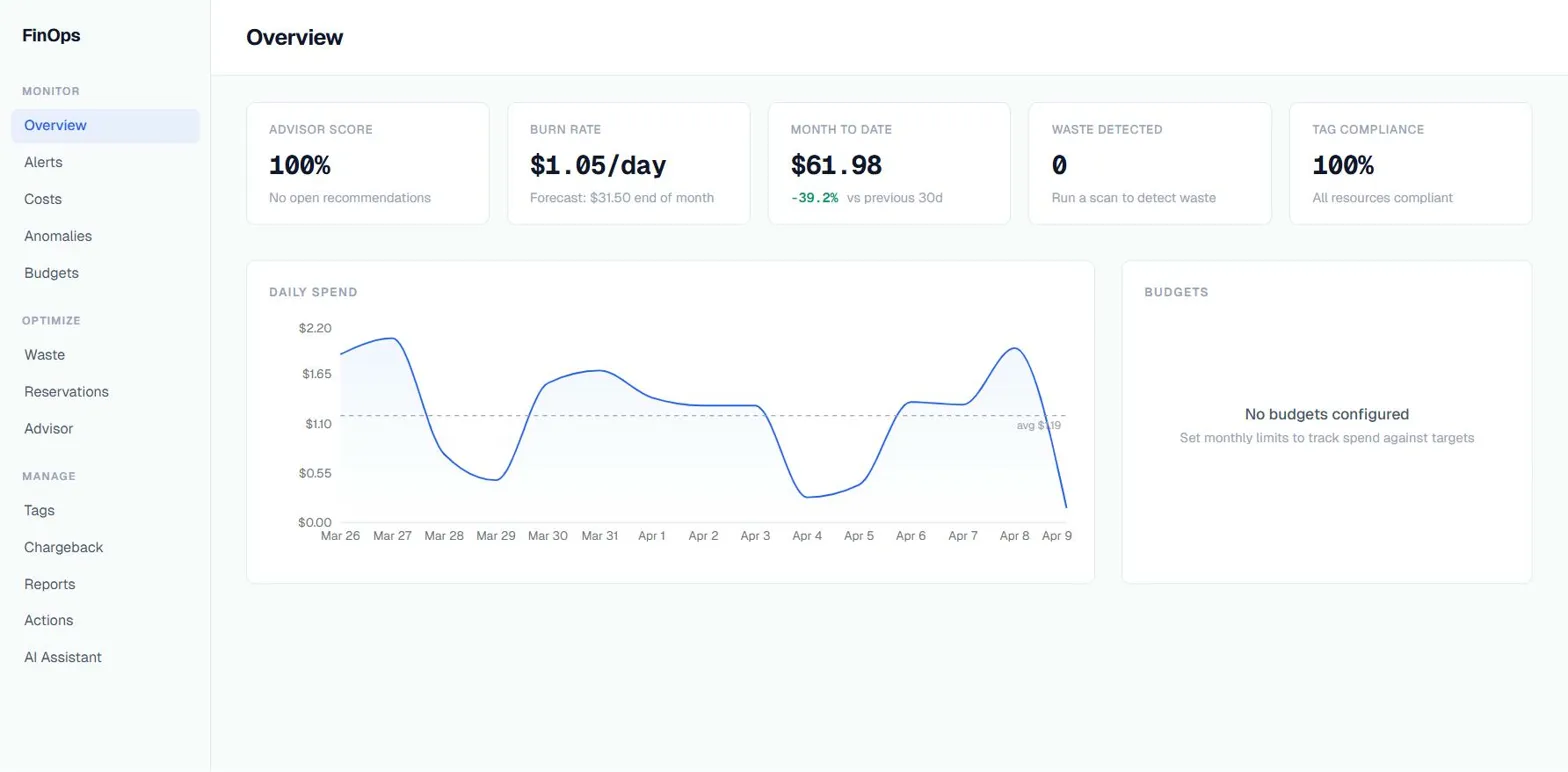
The result is an Azure FinOps dashboard that uses a triage agent and 7 specialists to analyze your Azure costs, detect waste, track budgets, and fix tag compliance. It connects to real Azure APIs, uses real cost data, and runs real actions on your subscription.
This is not production software. This is me stress-testing a framework. Here is what I found. It is also the last FinOps-flavored project I am planning to build for a while. I have done cost analysis, tag governance, and waste detection in enough shapes now that the next one will be something completely unrelated.
Why FinOps
I needed a problem domain that would actually push the framework. FinOps is perfect for that because it hits every pattern you would want to test in a multi-agent system:
Read-heavy queries. Cost breakdowns, budget status, anomaly detection. These are the easy ones. The agent calls an Azure API, gets data back, formats it. If a framework cannot handle this, it cannot handle anything.
Multi-step reasoning. “Why did my costs spike last week?” requires querying daily costs, comparing to baseline, breaking down by service, then by resource, and correlating with Azure Advisor recommendations. That is 4-5 tool calls in sequence where each step depends on the previous one.
Write operations with consequences. Applying tags to a resource or stopping a VM is something you do not want an AI doing without asking first. This is where human-in-the-loop matters and where most agent frameworks fall apart.
Cross-domain routing. A question like “what is wasting money and how do I fix it?” touches cost analysis, waste detection, Azure Advisor, and tag governance. You need a triage system that routes to the right specialist.
The Agent Architecture
Agent Framework 1.0 ships with a HandoffBuilder orchestration pattern. You define a triage agent that routes to specialist agents, each with their own tools. The framework handles the conversation history, handoff mechanics, and checkpointing.
Here is what I built:
User question
    |
    v
[Triage] --> cost-analyzer    (5 tools: query costs, compare periods, top spenders, burn rate, export diff)
         --> waste-detector    (5 tools: idle, orphaned, oversized, stale, VM CPU)
         --> advisor           (4 tools: recommendations, reservations, coverage, SKU pricing)
         --> anomaly-detector  (2 tools: detect spikes, daily trend)
         --> budget-tracker    (2 tools: budget status, forecast)
         --> tag-analyzer      (5 tools: untagged, missing tag, coverage, cost impact, apply tags)
         --> reporter          (1 tool: generate summary)
The triage agent is configured with with_autonomous_mode(agents=[triage], turn_limits={"triage": 1}). It reads the question, picks a specialist, and hands off. The specialist has all the tools it needs and the full conversation context via InMemoryHistoryProvider. When it is done, control returns to triage for the next question.
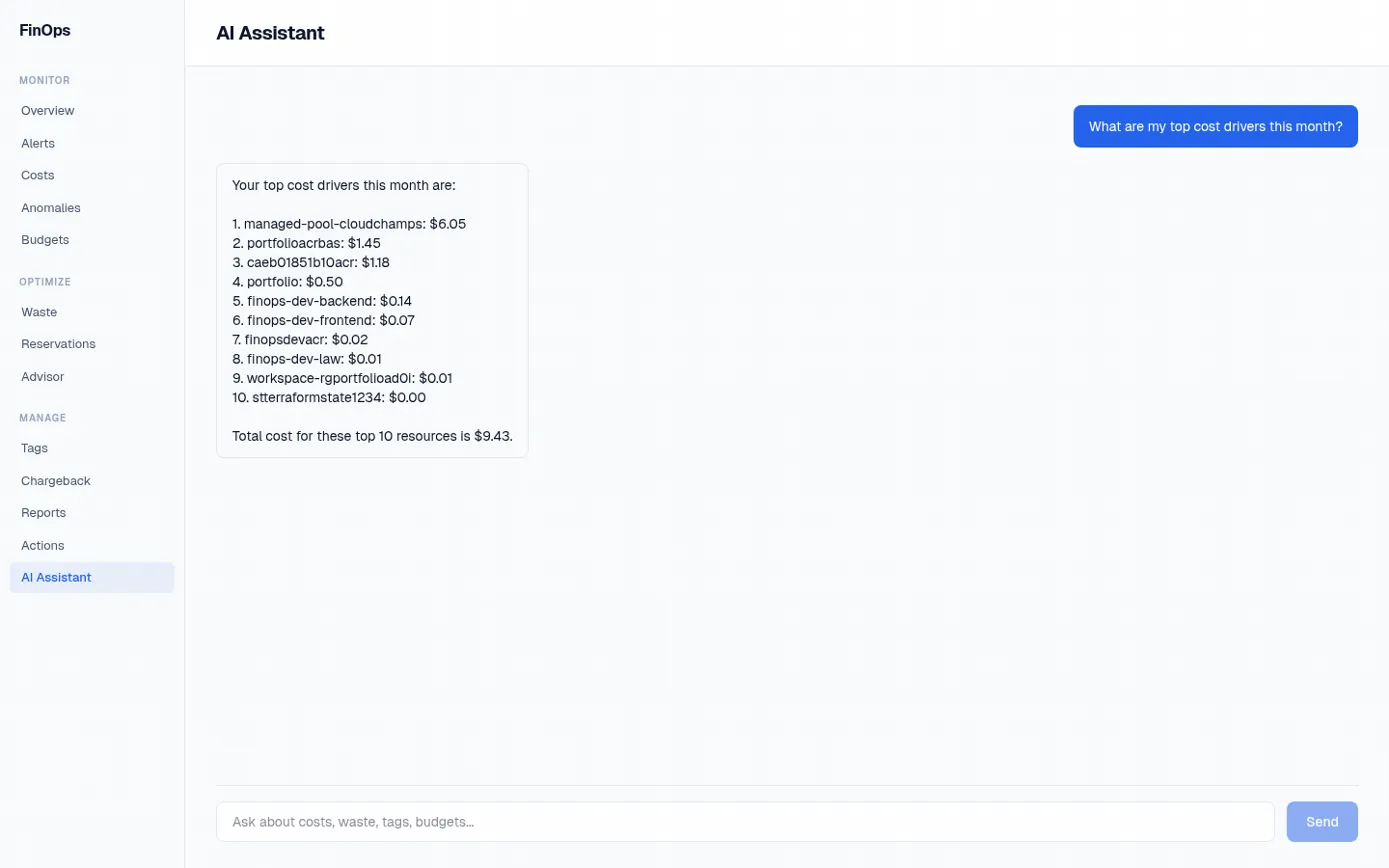
The thing that surprised me: this actually works well. The triage routing is reliable. The specialists stay in their lane. And the conversation memory means follow-up questions work naturally. “What about last month?” after a cost query works because the specialist has the full context from the previous turn.
What Agent Framework Gets Right
The HandoffBuilder pattern is genuinely useful. Multi-agent routing is the thing everyone tries to build from scratch and usually gets wrong. The framework’s implementation handles conversation synchronization between agents, automatic handoff tool generation, and context passing. I did not have to build any of that plumbing. One caveat: with_autonomous_mode is marked experimental in the Microsoft Learn docs, so factor that in if you are planning to ship this pattern to production.
Checkpointing is a real feature, not a checkbox. FileCheckpointStorage plus .with_checkpointing() lets the workflow survive restarts. The dashboard runs background scans on intervals (cost snapshots every 2 hours, waste scans every 6 hours). If the container restarts mid-scan, the checkpoint picks up where it left off. I initially dismissed this as a nice-to-have. It turned out to be essential for a long-running service. One thing the docs call out explicitly: FileCheckpointStorage uses pickle under the hood. Treat your checkpoint directory as a security boundary and never load checkpoints from untrusted sources.
@tool(approval_mode="always_require") solves human-in-the-loop properly. My apply_tags tool is marked with this decorator. When the agent wants to apply a tag to a resource, the framework pauses the workflow and emits an approval request. The user approves or rejects. No custom event loop, no manual state management. It just works.
FoundryChatClient makes Azure integration painless. Point it at your AI Foundry project endpoint, give it a managed identity, and you are done. No API key management, no token refresh logic, no credential rotation. The factory falls back to OpenAIChatClient for local development, which is a nice touch.
You Do Not Always Need Code
One thing worth calling out before the rough edges: you do not actually have to write Python or C# to build an agent on Azure. The Foundry portal now supports three different agent creation paths, and for a lot of use cases the no-code option is the right answer.
Prompt agents are the no-code path. You open the Foundry portal, go to the Agents page, click new agent, pick a model, write instructions, attach knowledge sources and tools from a list, and you are done. No repo, no deploy pipeline, no framework at all. For a bot that answers questions against a document library or queries Azure AI Search, this is often all you need.
Workflow agents are currently in preview. They give you a visual builder for multi-step orchestration, or you can define the same workflow in YAML via the VS Code AI Toolkit. This is the closest portal equivalent to what I built with HandoffBuilder, minus the custom Python tools.
Hosted agents are also in preview. You still write code, but Microsoft hosts the container for you and you deploy via the az CLI. Useful if you want the framework’s flexibility without managing Container Apps yourself.
I went with code for this dashboard because my tools are custom Python that call Cost Management, Resource Graph, and Advisor through the Azure SDK. You cannot express that in the no-code Prompt agent builder. But if I were building a simpler assistant, I would start in the portal first and only drop down to code if I hit a wall.
What Is Rough
The documentation is still catching up. The framework shipped April 3rd and I am writing this a week later. The API reference on Microsoft Learn is complete, but the how-to guides have gaps. I figured out the AG-UI integration by reading source code and the API reference page, not a tutorial.
AG-UI is pre-release. The agent-framework-ag-ui package is still --pre. The streaming chat endpoint works, but I would not call it stable. I wrapped the import in a try/except in my FastAPI lifespan handler so the dashboard still works with the plain REST chat endpoint if AG-UI fails to load.
Error messages in multi-agent workflows are opaque. When a specialist agent fails mid-conversation, the error surfaces as a generic workflow exception. Finding which agent, which tool call, and which step failed requires digging through logs. The framework could do better here.
The Python package split is confusing. You need agent-framework-core, agent-framework-openai or agent-framework-foundry, and optionally agent-framework-ag-ui. The meta package agent-framework installs everything, but if you are optimizing your Docker image size (which you should be), you need to figure out which sub-packages you actually need. I got this wrong twice before landing on the right combination.
The Dashboard Beyond Agents
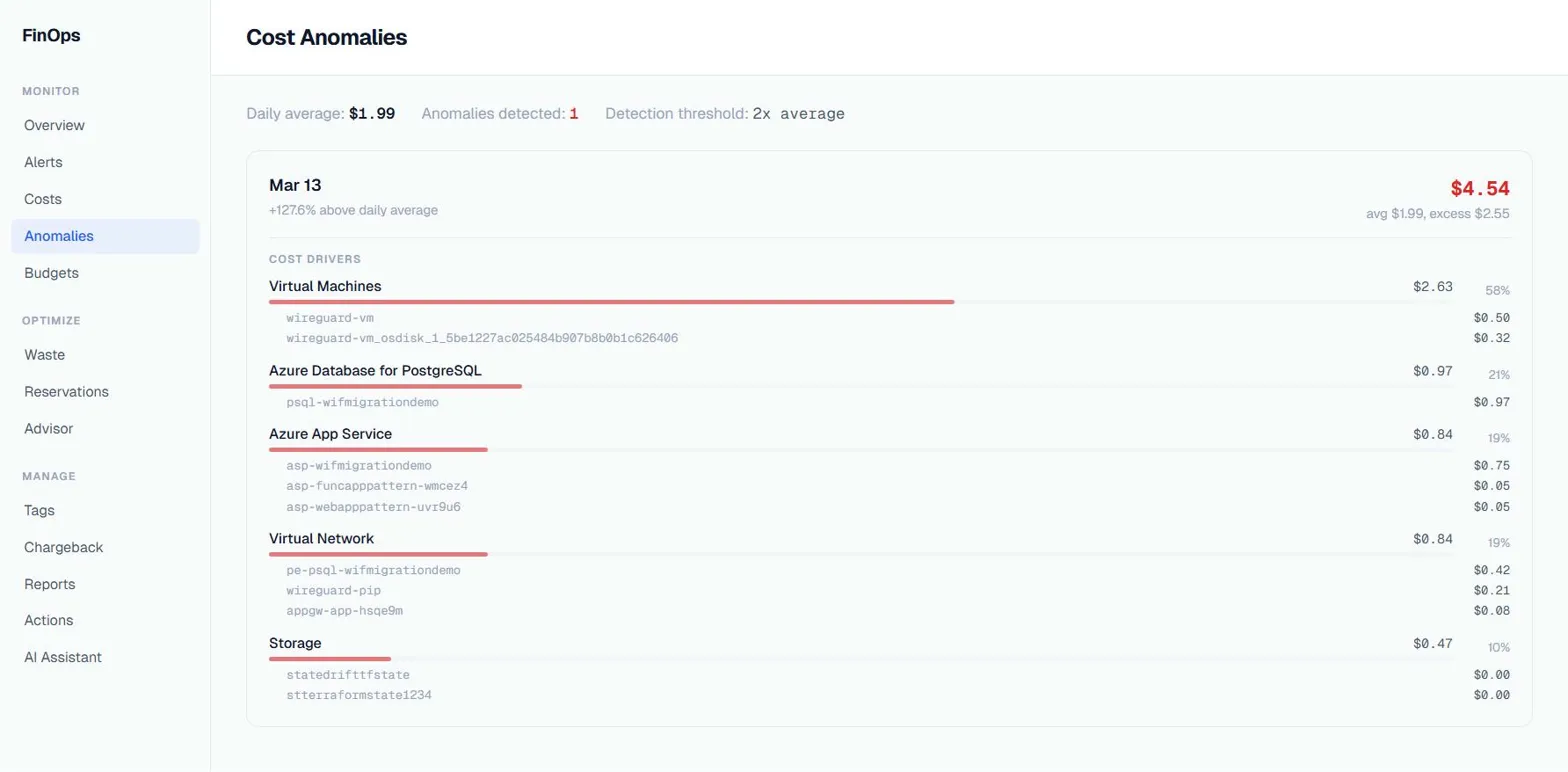
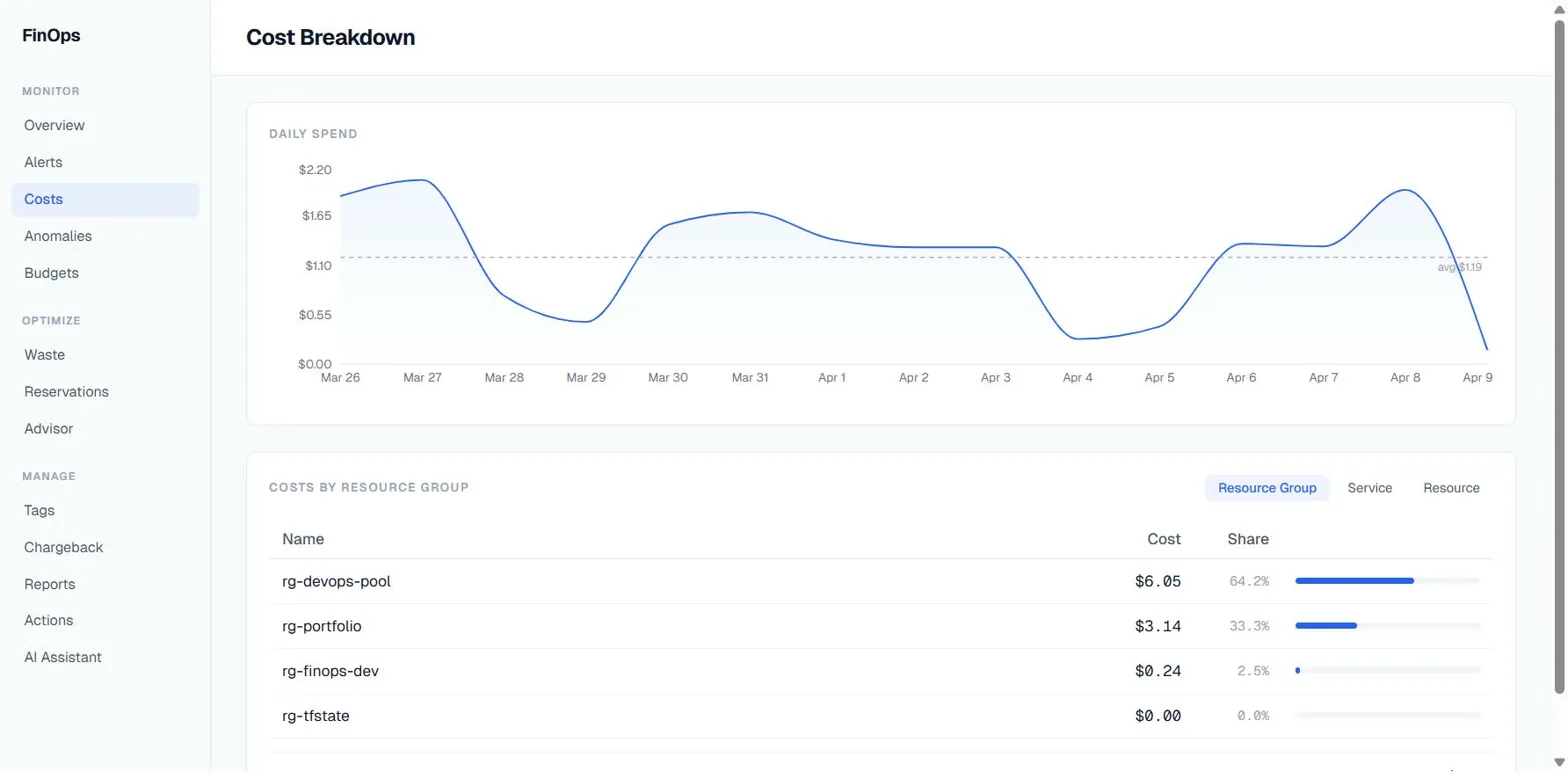
The agent part is the showcase, but the dashboard does a lot more without AI:
42 REST endpoints across 13 routers. Costs, waste, anomalies, budgets, tags, advisor, alerts, actions, reports, chat, health, onboarding, tag management.
14 KQL queries for waste detection. Stopped VMs, orphaned disks, orphaned NICs, orphaned public IPs, orphaned NAT gateways, empty App Service Plans, idle load balancers, idle application gateways, oversized SQL databases, oversized App Service Plans, old snapshots, empty storage accounts, unprotected Key Vaults, and running VMs for CPU analysis. Each runs against Azure Resource Graph.
Autonomous background scans using APScheduler. Cost snapshots every 2 hours, waste scans every 6 hours, anomaly detection every 4 hours, budget checks every 2 hours, tag compliance every 6 hours. Results are stored in Azure Blob Storage and served from cache.
Proactive alerts with AI enrichment. The scan results get fed through an AI analysis step that generates a human-readable explanation of what the alert means and what to do about it.
Tag governance with sibling-based suggestions. The tag compliance page shows which resources are missing required tags, and when you click “Fix”, it suggests tags based on what sibling resources in the same resource group already have.
The Stack
| Layer | Tech |
|---|---|
| Frontend | Next.js 16, React 19, Tailwind CSS, Recharts, SWR |
| Backend | FastAPI, Python 3.13, Pydantic, APScheduler |
| AI | Agent Framework 1.0, Azure OpenAI (gpt-4.1-mini) |
| Infra | Azure Container Apps, Bicep with Azure Verified Modules |
| Azure APIs | Cost Management, Resource Graph, Advisor, Monitor, Consumption, Resource Manager |
Everything is in one repo. make dev runs both services locally. make deploy deploys to Azure Container Apps. The Bicep templates use Azure Verified Modules for everything: identity, ACR, storage, Key Vault, AI Foundry, Container Apps, and RBAC.
109 pytest tests. mypy —strict with zero errors. ruff clean. The code quality bar is high because this is going on GitHub and I have to look at it again in six months.
Getting Started If You Want to Build One Yourself
If the portal options do not fit and you want to start with the Python framework, here is the short version of what I wish someone had told me on day one.
Install the meta package plus the provider you actually need. For Azure, that is pip install agent-framework agent-framework-foundry. Add agent-framework-ag-ui --pre only if you want the streaming chat protocol, and expect it to move. If you are optimizing Docker image size, install agent-framework-core plus the specific provider package instead of the meta package.
Pick your chat client based on where you run. FoundryChatClient points at an AI Foundry project endpoint and authenticates with a managed identity, which is the path you want in production. OpenAIChatClient is the fallback for local development against a plain API key. The factory pattern in my repo shows how to pick between them at startup based on which environment variables are set.
Start simple. A single ChatAgent with one @tool function is enough to prove the loop works end to end. Only move to HandoffBuilder once you have more than one clear specialist. Only add FileCheckpointStorage once you have a long-running workflow that actually benefits from surviving a restart. Adding all the machinery up front just gives you more things to debug when the first run fails.
Read the Microsoft Learn quickstarts before you read blog posts (including this one). The API reference on Learn is complete and kept current. The how-to guides still have gaps, but the reference is authoritative. One thing to keep in mind: the framework is GA as of April 3, but a few parameter names shifted in the final betas before the 1.0 cut. Any code snippets from older blog posts or pre-GA tutorials may not compile against the released package, so when in doubt, trust the GA reference over someone’s RC-era example.
The Compound Error Problem, Revisited
I wrote about why most agentic AI fails in production a few days ago. The core argument: each step in a multi-agent workflow has a probability of failure, and those probabilities multiply. A 10-step workflow at 90% per-step accuracy has a 35% overall success rate.
Building this dashboard was a good test of that theory. The triage-to-specialist pattern keeps the step count low. A typical interaction is: triage routes (1 step), specialist calls a tool (1 step), specialist formats the response (1 step). Three steps. At 90% per-step accuracy, that is 73% overall. Good enough for a dashboard that a human is actively watching.
The exception is the reporter agent. Its generate_summary tool internally queries multiple services (cost, waste, anomaly, budget, tag, advisor) before composing the final action plan. More upstream data sources means more things that can fail before the agent even starts reasoning. In practice this was fine because the underlying services have their own retry and fallback logic. But it is a reminder that the step count you see in the agent graph is not the same as the step count that actually determines reliability.
What I Would Do Differently
Start with the REST API, add agents later. I built the agent workflow early and then realized most of the dashboard does not need agents at all. The background scans, the alert system, the tag governance page, they all work through regular API calls. The AI chat is a feature, not the foundation. If I started over, I would build the dashboard first and add the agent chat as the last feature.
Use a real database. Everything runs on Azure Blob Storage with in-memory fallback. It works, but querying historical trends or doing analytics on past scans would be much easier with Cosmos DB or even SQLite. I skipped this because the scope was already big enough.
Build the frontend with a component library. I hand-rolled every component with Tailwind CSS. It looks fine but it took longer than it should have. shadcn/ui or Radix would have saved time.
Should You Use Agent Framework 1.0?
If you are building a multi-agent system on Azure, yes. The HandoffBuilder pattern, the checkpointing, and the Foundry integration save you weeks of plumbing code. The framework is opinionated about the right things (conversation management, tool execution, handoff mechanics) and flexible about the things that should be your decision (model provider, storage, deployment).
If you are building a single-agent chatbot, it is overkill. You do not need HandoffBuilder for one agent. Just use the OpenAI SDK directly.
If you are not on Azure, the framework still works with OpenAI, Anthropic, and Ollama providers. But the Foundry integration is where the real value is, and that is Azure-only.
The framework just shipped. The documentation will improve. The AG-UI integration will stabilize. The package story will get cleaner. I would rather build on something with a clear trajectory and Microsoft’s backing than glue together five open-source libraries that might not exist next year.
The full source code is on GitHub. MIT licensed. Run it against your own subscription and see what your agents find.